Instant Games
Facebook is moving games from its Canvas framework to a newer platform. This change is being introduced across Facebook games and is connected to updated privacy rules.


I’ve been playing Bingo Blitz for a long time, will this affect my playing?
Almost everything stays the same. Your Bingo Blitz account, progress, PLUS status, inventory, login, and existing friends are not affected.
You can continue opening Bingo Blitz through the same Facebook link or icon as before!
I’m a new player!
This change means a few more steps for new players, that are creating their Bingo Blitz account for the first time.
Players creating a Bingo Blitz account for the first time through Instant Games may notice:
- You will see a default avatar and a generic name instead of your Facebook profile photo and name. You can choose one of the avatars for your profile, and the name can be changed maximum of 2 times from!
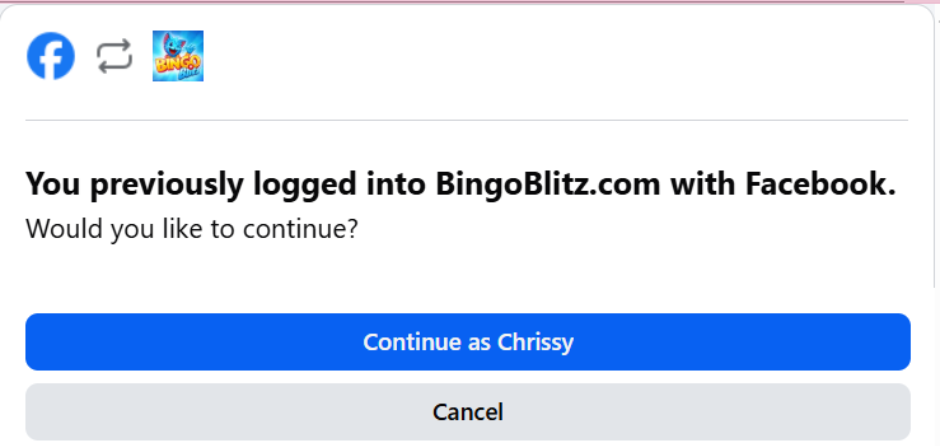
To use your real Facebook photo, you need to log in to Bingo Blitz on mobile with the same Facebook account. Check out the steps here:
– click on the blue Facebook icon;

– a window will pop-up where you will need either need to put in your Facebook credentials or, if you are already logged into Facebook on your browser, just click on Continue and play right away!
- Your Facebook friends who already play Bingo Blitz may not appear automatically when you log into the new account. In this care, you will need to manually add the user IDs of your friends. Existing accounts and friend connections are not affected.
Instant Games changes how new Facebook accounts are set up, but it does not change your existing Bingo Blitz experience.
FAQ
- What’s actually changing?
Facebook is retiring its older Web Games (Canvas) system and moving all games, including Bingo Blitz, to its newer platform, Instant Games. This is Facebook’s decision, not ours, and for existing players it’s basically invisible. - Will I lose my account, progress, or purchases?
No. Your account, progress, VIP status, PLUS subscription, and inventory all stay exactly as they are. - Do I need to do anything?
No. You’ll keep opening Bingo Blitz the same way, same link or icon, and everything just works. - Is logging in through Facebook affected?
No, logging in with Facebook works exactly as it does today. - Will I keep my existing friends?
Yes, your current friends list stays exactly as is. - Will incentives, gifts, and links still work?
Yes, as normal. - Can I still share to my timeline, like when I hit a new level?
Yes, sharing to Facebook works exactly the same as today. - Why can’t I subscribe to Bingo Blitz Plus through Facebook?
Subscriptions have stopped being supported inside Facebook’s games platform a while ago, on the old system or the new one. You can subscribe through the regular app or the Xtra platform. - I can’t complete a purchase, what should I do?
This is sometimes a restriction tied to your location on that specific purchase platform. Try purchasing through Xtra instead. - A link took me to an extra “leaving Facebook” confirmation screen, is that normal?
Yes, that’s an extra step Facebook added on their end for links that go outside Facebook. Just confirm and continue, nothing’s wrong. - The game showed an extra loading icon before starting, is that normal?
Yes, you might briefly see a generic loading icon before our usual Bingo Blitz screen appears. Total loading time is about the same, it’s just two small steps instead of one. - I just started playing and got a default name/avatar and an empty friends list, what happened?
That’s specific to brand new accounts created after this change. Facebook no longer automatically shares a new player’s name, photo, or friends list with games. You can set your own name and avatar anytime in your in-game user profile, and add friends manually by their in-game ID. If you already had an account before, none of this applies to you. - How do I go fullscreen?
Click the double arrow icon in the top right corner of the game. - Can I get rid of the Game Center panel on the right side?
Yes, click the small icon with the lines and arrow (rightmost one) to collapse it. Click it again to expand it back. - How do I manage notifications for Bingo Blitz?
You can turn them on or off from the message box, and also from the bell icon in the Facebook games sidebar. - Where do I control who can see that I play Bingo Blitz?
In the Facebook games sidebar, click the padlock icon, that controls your visible game privacy on Facebook. - Where can I find the Fan Page now?
It’s in the hamburger menu now!